Search has changed. Not gradually, but sharply. In 2026, AI search traffic rose by 1,200%, according to data from Botric. Tools like ChatGPT, Google AI Overviews, and Perplexity now answer user questions directly, pulling content from websites they consider structured, accurate, and machine-readable. If your website's content management system was built for keyword rankings and page views, it was not built for this.
This is the core reason businesses in 2026 are not just updating their websites; they are switching to professional CMS development services that can deliver content to AI engines, voice interfaces, and multiple platforms at once. The businesses that made that move early are showing up in AI-generated answers. The ones still running legacy setups are not.
This article explains what has changed, what an AI-ready CMS actually looks like, and how to know whether your current setup is costing you visibility right now.
What AI Search Means for Your Website in 2026
Before 2024, SEO was about focusing on keywords, creating backlinks, and getting your website to be ranked on the first page of Google.
Generative Engine Optimization, known as GEO, is the process of structuring content so that AI platforms select it as a source when generating answers. When a user asks ChatGPT or Perplexity a question about a service your business offers, GEO determines whether your content gets cited or ignored. Unlike traditional search rankings, GEO depends heavily on how your content is structured in the backend, which means it depends directly on your CMS.
AI search engines cannot explore your website in the same way that humans do. The pages are broken into separate pages and assessed for clarity, density and semantics. A CMS that produces clean HTML, that supports structured data markup, such as JSON-LD schema and separates presentation from content, gives AI crawlers precisely what they require. A CMS built on outdated architecture, buried in plugin conflicts, or missing metadata fields gives them nothing to work with.
According to a 2026 guide from LLMrefs, one of the most common reasons websites are invisible to AI search engines is that their CMS blocks AI crawlers in the robots.txt file or renders key content through client-side JavaScript that AI bots cannot process. Most businesses have no idea this is happening.
Why Your Current CMS Is Likely Not AI-Ready
Most businesses built their websites on popular platforms when AI search did not exist. Those platforms were designed to publish pages and manage content for human readers. That design is now a limitation.
Here are the specific ways a standard or outdated CMS fails in an AI search environment:
Unstructured content output: Off-the-shelf platforms often output content wrapped in generic HTML without a semantic structure. There aren't any indications of content type and no definitions of entities, and there are no machine-readable connections between content pieces. AI engines are unable to discern meaning from a web page that appears the same regardless of whether it's a product description, blog post, or a contact form.
Plugin-dependent metadata: Many websites depend on external SEO plugins to provide schema markups and metadata. These plugins produce generic structured data based on templates, which does not match the actual structure of the site's content. A professional CMS web development combines structured data based on a content model so that each type of content includes machine-readable fields right from the beginning.
Client-side rendering: A variety of well-known CMS websites and builders render content using JavaScript in the browser of the user instead of providing pure HTML from a server. Google's documentation confirms AI crawlers are unable to run JavaScript effectively. If your site is loaded in a browser, but is not the form of a server response, AI engines are unable to read the content.
Slow Core Web Vitals on mobile: AI search rankings factor in page performance signals. A CMS filled with unneeded plugins as well as images that are not optimized for display and excessive CSS slows the loading time of mobiles, which is an immediate ranking signal for Google and AI-powered discovery platforms.
Globally, the CMS market grew to $30.91 billion in 2026. The market is predicted to grow to $45.71 billion by 2030, as per Mordor Intelligence. The growth in this area is driven by companies who realize that CMS is more than just a tool for publishing. It's digital infrastructure. Treating it as anything less is a competitive disadvantage.
What an AI-Ready CMS Actually Looks Like
An AI-ready CMS is not a specific platform. It is a set of technical capabilities built into whatever system manages your content. Here is what those capabilities look like in practice:
Structured content modelling: Instead of presenting all pages as blank pages, an AI-ready CMS describes content as typed fields. A blog post includes author names, a publish date field, a topic tag field and a summary. These fields are directly linked to schema markups that AI engines use to figure out what the content means and whether it's worth citing.
Server-side rendering: Content is delivered as clean HTML in the server response, not through client-side JavaScript. This ensures that AI bots, along with every other crawler and browser, can access the full page content on the first request.
API-first architecture: Content is accessible through structured APIs, meaning it can be delivered to a website, a mobile app, a voice interface, or an AI agent query using the same data source. This is the foundation of headless CMS development, and it is a core requirement for omnichannel content delivery in 2026.
Automated schema generation: A well-designed CMS creates schema markup from content fields automatically, instead of relying on an application plugin to apply generic templates. When a new piece of content has been published by the editor, the software produces Article schemas, BreadcrumbList schema, and FAQ schema without manual input by the editor of the article.
Content freshness signals: AI engines track when content was last updated. A CMS with automated dateModified fields and structured revision history gives AI systems the freshness signals they need to trust the content as a current source.
| Standard CMS | AI-ready CMS | |
| Content structure | Pages built on unstructured blocks and free-text fields. No typed content model. Search engines and AI engines cannot identify what each block represents. | Content organized into typed fields: author, publish date, topic, and summary. Each field maps directly to structured data that AI engines use to understand and cite content. |
| Rendering method | Content rendered through client-side JavaScript in the user's browser. AI crawlers do not execute JavaScript reliably, meaning key content is invisible to them. | Full HTML is delivered server-side on the first request. Every crawler, browser, and AI bot reads the complete page without requiring JavaScript execution. |
| Schema markup | Generic schema applied by a third-party SEO plugin using fixed templates. Output does not reflect the actual content model and breaks when the plugin updates. | Schema markup is generated automatically from content fields Article, FAQPage, and BreadcrumbList without manual input. Every published page carries accurate, current structured data. |
| Content delivery | Single-channel output built for one website. Pushing content to a mobile app, voice interface, or AI tool requires separate manual processes or expensive plugin workarounds. | API-first architecture delivers the same content to a website, mobile app, voice interface, digital display, or AI chatbot from one structured source. |
| Mobile performance | Page speed is dependent on the plugin stack. Each active plugin adds database queries, CSS files, and JavaScript. Core Web Vitals scores degrade as the plugin count grows. | Performance built into the architecture, optimized images, lean CSS, no plugin bloat. Core Web Vitals scores remain stable as content volume and traffic grow. |
| Content freshness signals | No automated freshness tracking. AI engines cannot verify when content was last reviewed, which reduces the likelihood that it is selected as a trusted, current source. | Automated dateModified fields and structured revision history give AI engines the freshness signals needed to treat the content as a reliable, up-to-date source. |
Headless CMS Development: The Architecture Behind AI-Ready Content
One of the most evident indicators of how serious companies are about AI search capabilities is the transition towards search engines that are based on headless CMS development. The headless CMS market is expanding at a 22.1 % compound annual growth rate and is predicted to hit $5.53 billion in 2032, as per Future Marketing Insights. Digital leaders have plans to boost their non-headless CMS expenditure by 25% over the next calendar year.
A headless CMS differentiates the management of content from presentation. This backend stores and arranges content. The frontend, which could be an app, a mobile application, a digital kiosk or even an AI chatbot, is able to pull this information through an API to render it the way it is required to.
To ensure AI search engine readiness, the architecture is important due to a specific reason: if content is in an API-accessible, structured format, AI engines can retrieve it without hassle, and without needing to analyze the visual design layer of a site. The content is separate from the presentation. That's exactly the way that AI systems use when they pull passages to use in their generated answers.
For businesses that manage different types of content, such as a website, app, an online store, social media platforms and AI-powered customer service tools, a headless CMS created by professional CMS development services is the only architecture that handles all of those delivery points from a single content source.
The Real Cost of Staying on a Legacy CMS in 2026
Businesses that delay this shift are paying for it in ways that do not always show up on an invoice.
Invisible in AI answers: According to Botric, 85.7% of businesses still have no strategy for AI search visibility. The businesses with one have the potential to capture a large portion of AI-generated citations as well as the traffic that results from them.
SEO plateaus despite consistent content: Teams that produce regular content on old platforms are experiencing slowing rankings due to the technological signals that Core Web Vitals, structured data, and server-side rendering are insufficient. Publishing more content with a technically weak CMS yields lower returns.
Editorial team bottlenecks: A 2023 Content Marketing Institute report found that 63% of teams working on content reported that their CMS affected their workflow instead of becoming simpler. In 2026, this friction will have a direct impact, slowing publication cycles, resulting in fewer content signals getting to AI engines, which translates to lower citations and fewer discoveries.
Plugin dependency costs: A typical WordPress site that utilizes the page builder, SEO plugin, as well as a security scanner, performance optimizer and membership tool will be spending between $500 and $1200 each year on plugin licenses. However, they still need regular developer intervention in order to solve issues after the release of platform updates.
If more than three of these scenarios describe your current configuration, the cost of remaining is already greater than the price of changing.
Who Needs Professional CMS Development Services Right Now
Every business does not require the same amount of money. Here's a detailed breakdown by type of business:
Small studios and freelancers: If you're managing websites for clients, and you are losing clients because your websites aren't able to handle well-structured data, speedy mobile performance, or custom workflows for editorial, a professionally designed CMS template designed once will benefit you across many projects.
Growing small and medium businesses: If you've grown out of your existing platform, slow websites, insufficient integrations, frustrations of the editorial team or no AI search visibility, this is when CMS migration services will provide you with more value than trying to patch your existing system.
E-commerce businesses: Catalogue management for products, inventory Integration, content multilingual and AI-driven product suggestions all require the use of a CMS platform that the off-the-shelf options can't provide without substantial cost of customization.
Enterprises and regulated industries: Financial, legal, healthcare and government institutions require CMS platforms that can support compliance workflows, access controls based on role, audit trails, as well as integration with the existing enterprise systems.
Does your business fall into one of these categories?
Get a free CMS consultation from Global Key Info Solutions. We assess your current platform, identify the gaps, and recommend the right CMS solution without any obligation.
Get a free CMS consultation →7 Signs Your CMS Is Holding Your Business Back in 2026
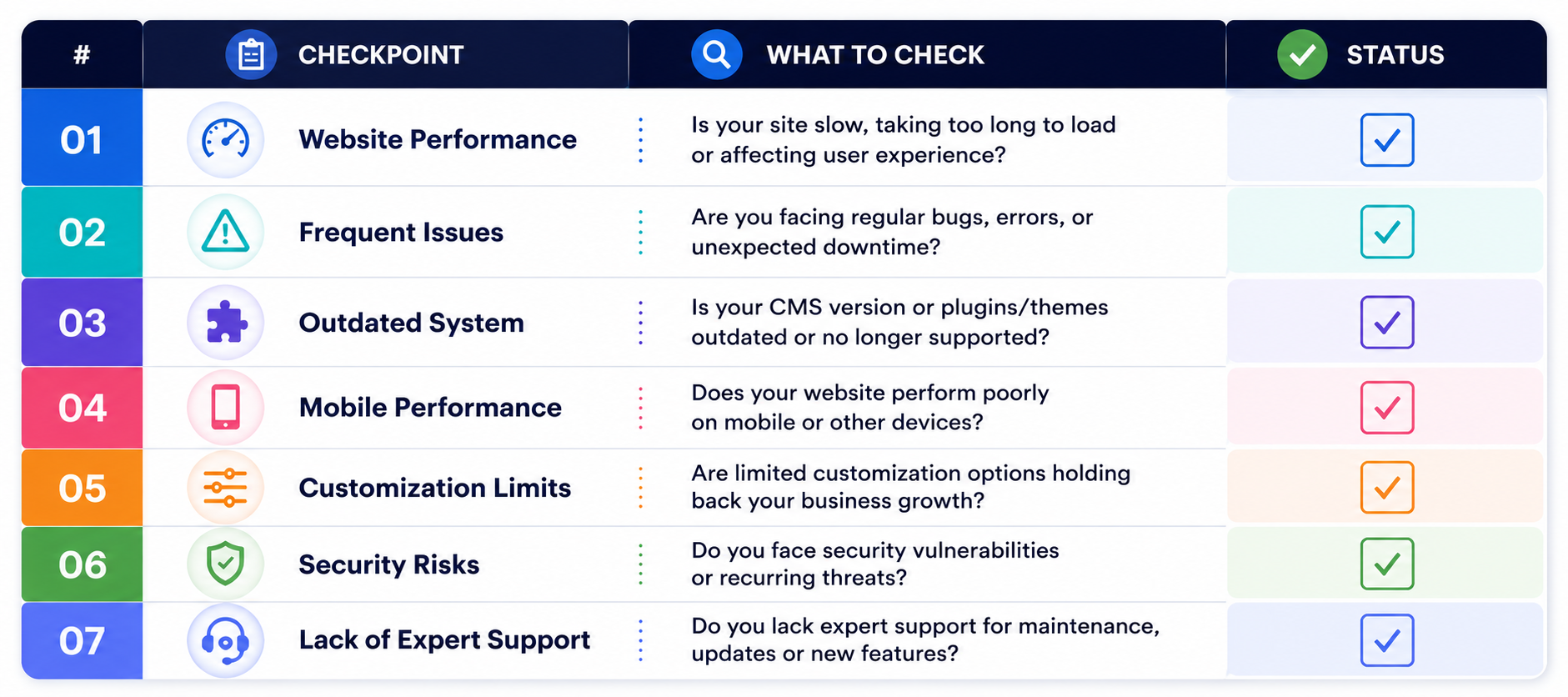
Run through this list honestly. If you recognize three or more of these, your CMS is costing you growth right now:
- Your pages do not appear in AI-generated answers for topics your business covers
- Core Web Vitals scores are in the amber or red range on mobile
- Your content team calls the developer every time they need a new page type
- You are running more than ten active plugins and paying for several of them monthly
- Structured data on your site is generated by a generic plugin, not built into your content model
- AI crawlers are blocked or cannot access your content due to client-side rendering
- You have had the same CMS for five or more years with no architectural review
Why Global Key Info Solutions
At Global Key Info Solutions, we work with freelancers, startups, small businesses, and enterprise teams to build content management systems that are structured for 2026, not 2016. Our CMS development services cover everything from custom CMS development built around your specific workflows, to headless CMS architecture for businesses managing content across multiple platforms, to CMS migration services for teams ready to move off legacy systems without losing SEO equity or content integrity.
We do not sell platforms. We build the right system for your business, designed to deliver content to human readers and AI engines with equal efficiency. The businesses winning in AI search today are not the ones with the largest budgets. They are the ones who built the right foundation.






0 Comments
Leave a comment